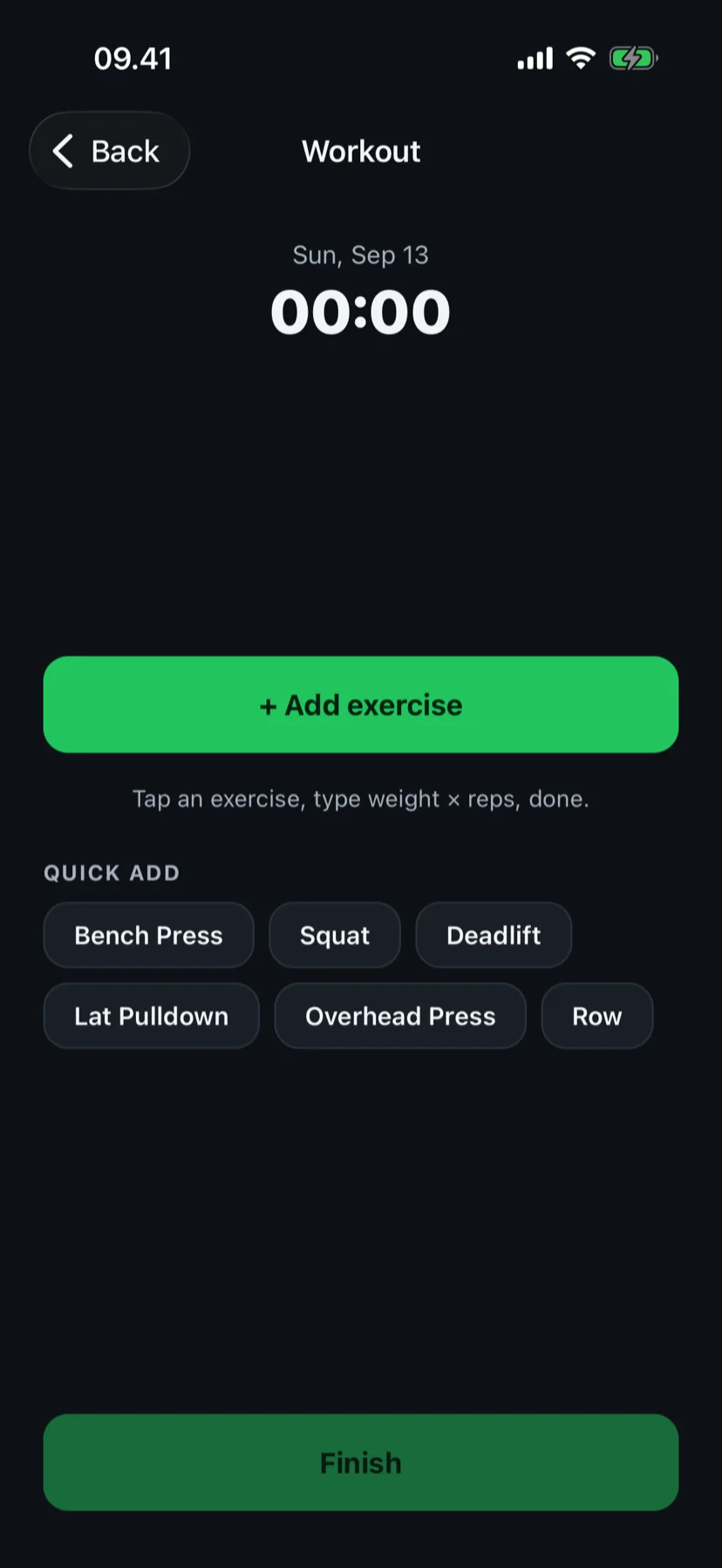
Tap an exercise, type weight × reps, done.
Your first set is logged in under a minute — no setup wizard, no questionnaire. Want a plan instead? Say so on the first screen and Fit4i builds one from your recovery and equipment.
Log · Routine days · 14-zone muscle map · Plan when you want it
Fit4i is a gym workout tracker for iPhone. Log on your own or let it build the plan — either way, every set feeds the same muscle map.
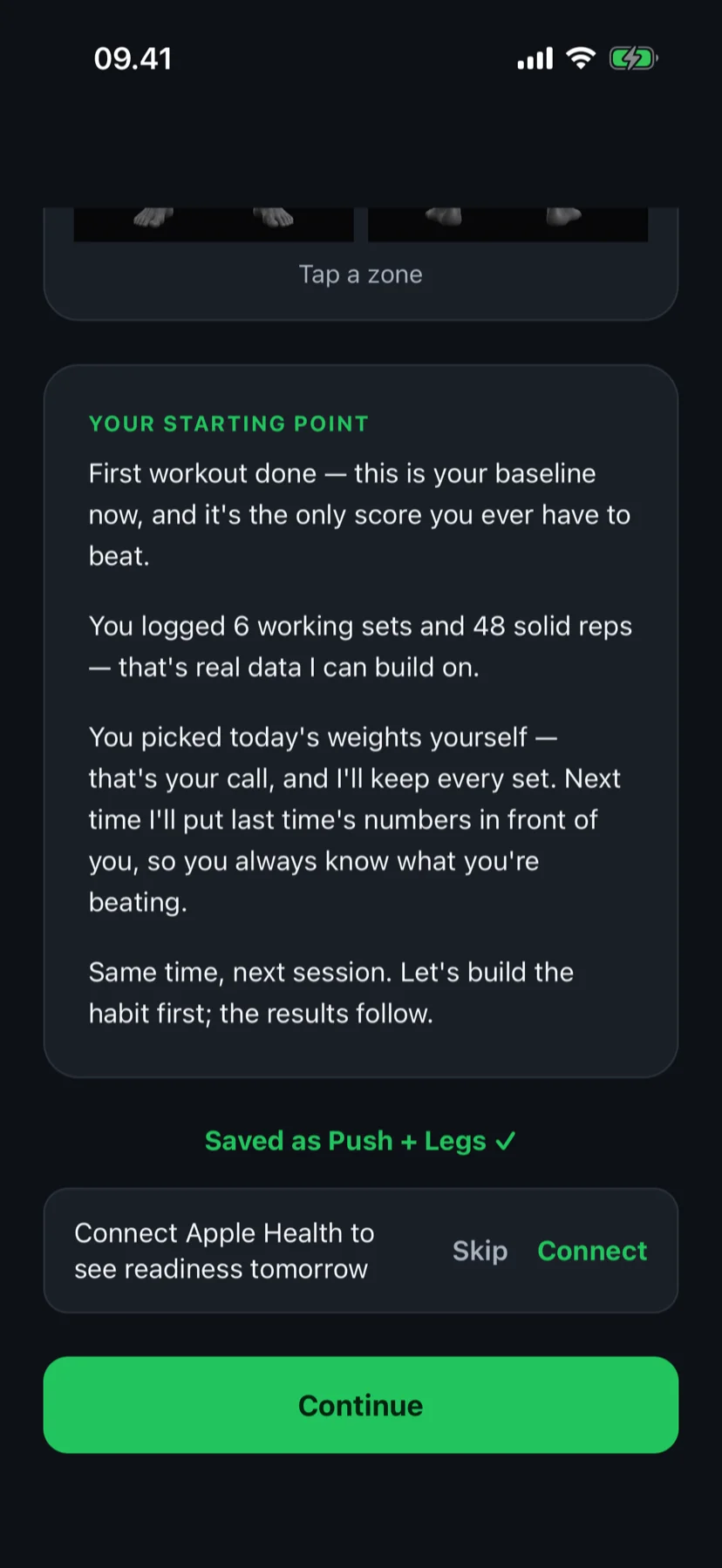
Finish a workout and save it as a routine day — no builder to fill in.
14 days of Pro · No card required · Works without a wearable
- Log sets without a wizard
- "Last time" under every exercise
- Save any workout as a routine day
- 14-zone muscle map — free
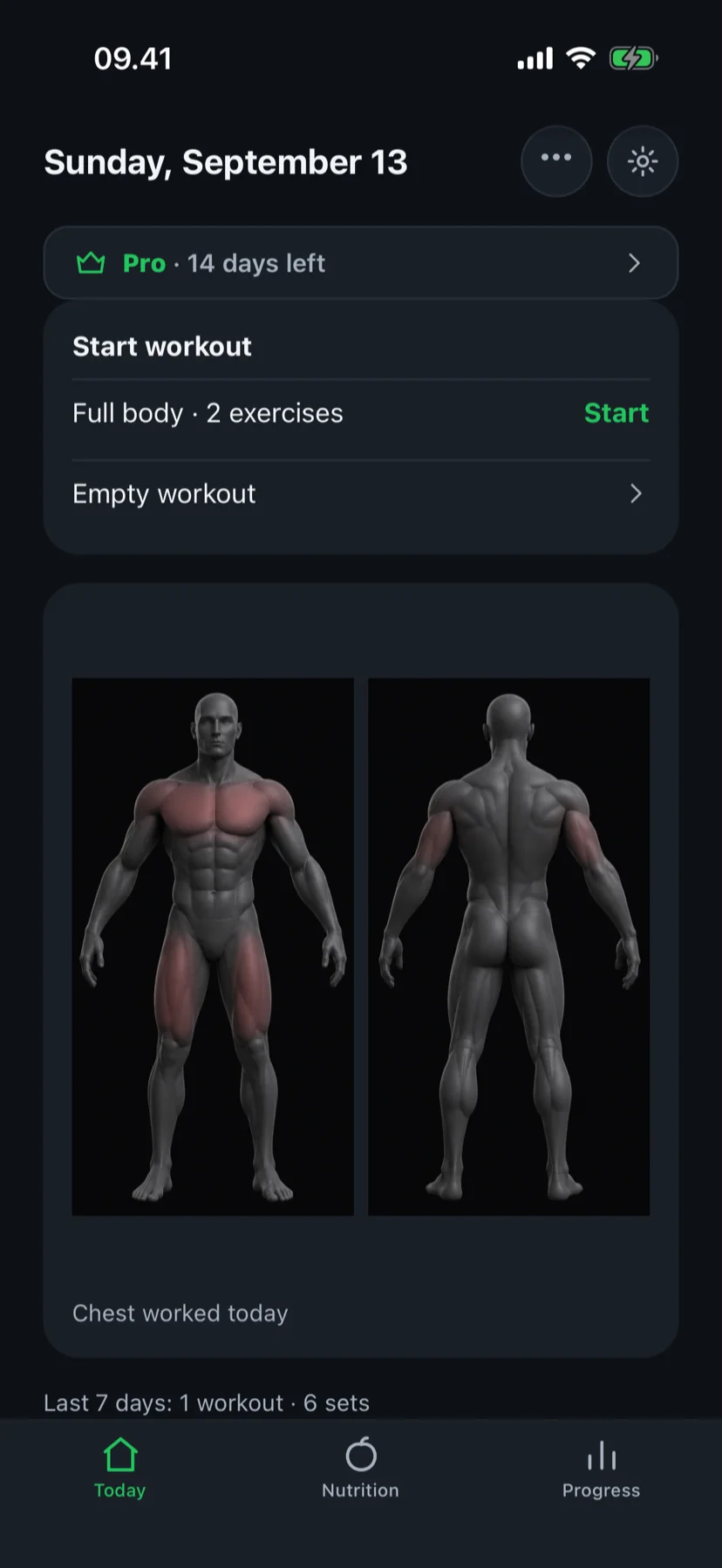
Two ways in. Pick one on the first screen.
Either way, every set feeds the same 14-zone muscle map — it knows what has recovered and what's overdue.
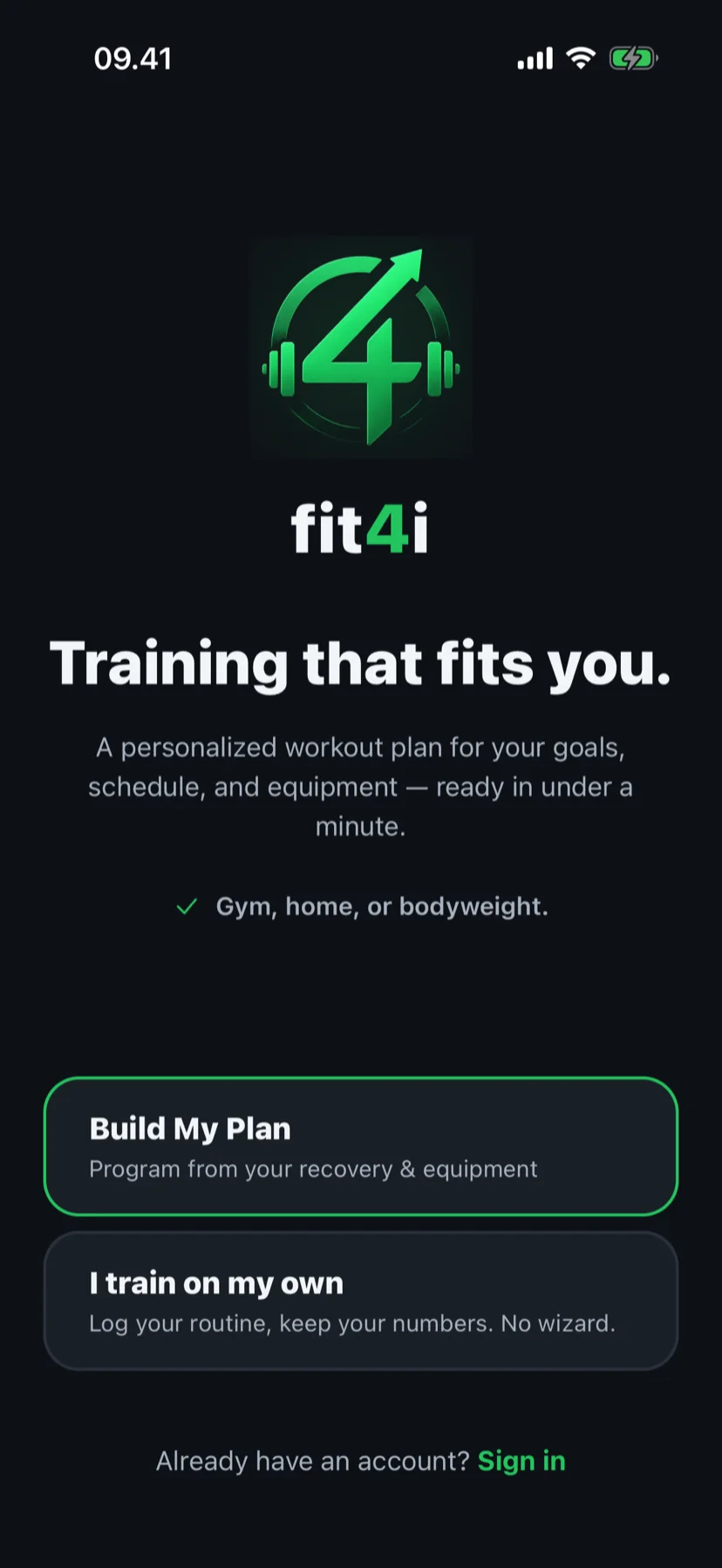
I train on my own
Log your routine, keep your numbers. No wizard.
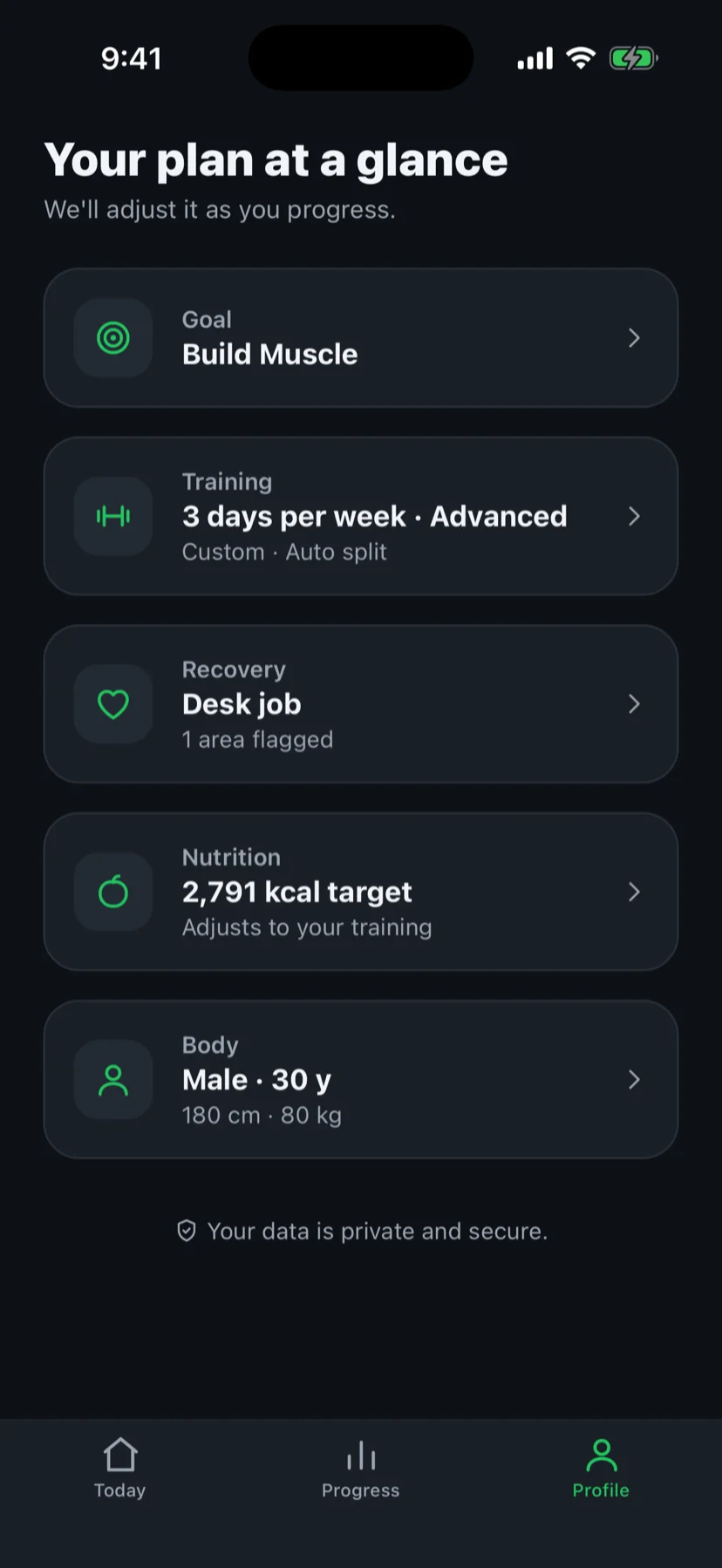
Sign in, enter your bodyweight, and you're inside an empty workout. Add exercises — or create your own — type weight and reps, tick the set. Finished? One card asks "Save as a routine day?"
Build My Plan
Program from your recovery & equipment
Pick your goal, experience, equipment and schedule and Fit4i builds the program — days, exercises, sets, reps and starting weights. Every morning the muscle map serves the day your body is readiest for and says why in one line.
Part of Fit4i Pro · 14 days free, no card
Skipping the plan today? "Empty workout" is always there — log, map and records still count it.
Want the plan later? Switch any time — your logged weights carry over. "Build my plan instead" lives in the Home menu.
Built for Apple Health
Reads sleep, HRV, resting heart rate and blood oxygen — with your permission, read-only.
Designed for iPhone
A native iOS app. Works with Apple Watch data via Apple Health, and with Polar devices.
Privacy-conscious
No ads, no data selling, no tracking across apps. Food photos are analysed and discarded, never stored.
Training and nutrition in one app
Workouts, recovery, calories, protein, fiber, water and body weight — one place, one plan.
Log the way you already train.
No setup wizard. Your first set is logged in under a minute — and every set after that carries your numbers forward.
Start with an empty workout
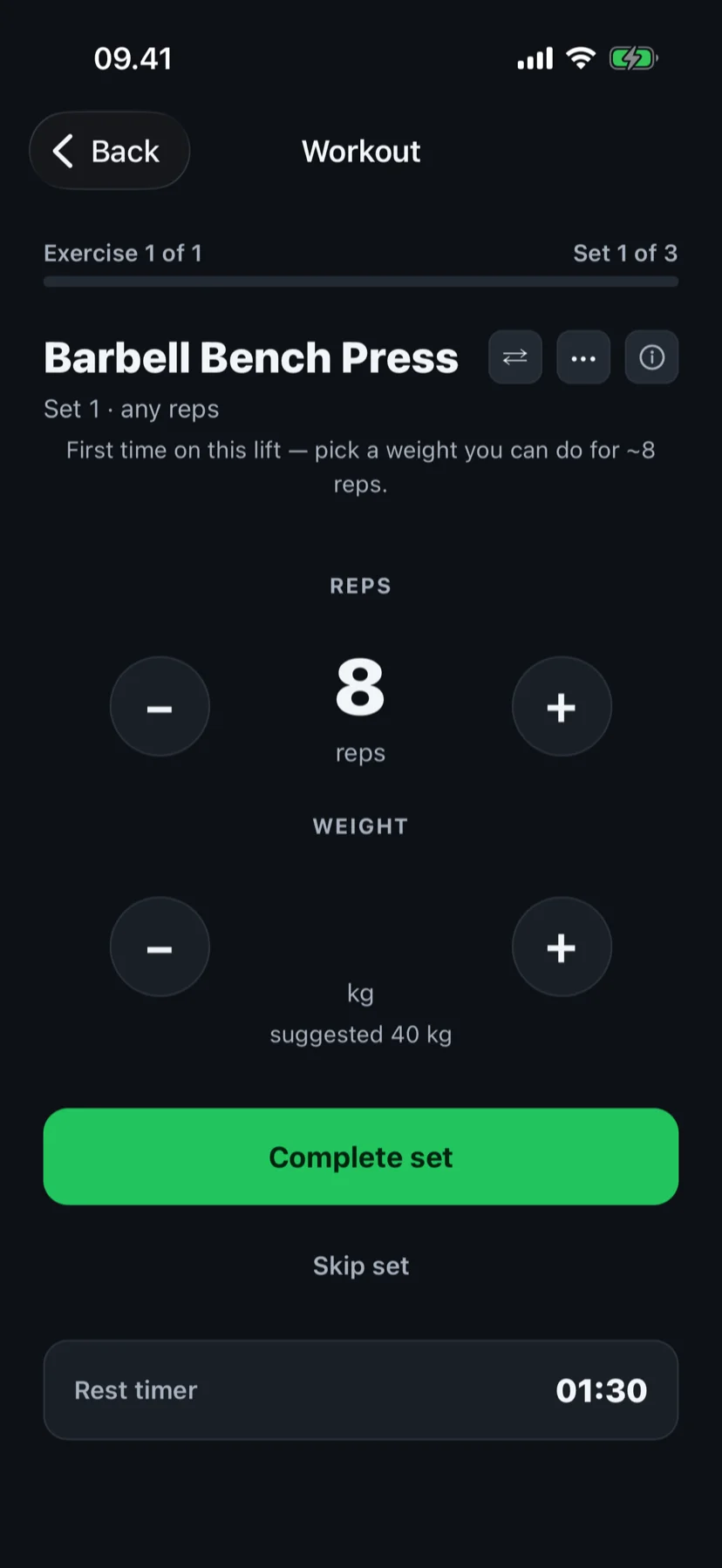
Add exercises — or create your own — type weight and reps, tick the set. Quick-add chips for bench, squat, deadlift, pulldown, overhead press and row; a suggested starting weight in grey the first time.
Tap an exercise, type weight × reps, done.Your numbers come back next time
The same exercise opens pre-filled from your previous session. Hit every rep at the same weight? A quiet line offers the next step — one tap to take it, none to ignore it. Rest timer and personal records: automatic.
Last time: 60×8, 8, 7 · 3 days agoAll sets hit — try 62.5 kg?Save it as a routine day
Finished? One card asks "Save as a routine day?" — that's your first routine day, no builder to fill in. Save a second one and you have a split. From then on every slot carries a target: fill the rep range and the weight steps up. Three sessions in range without reaching the top? A stall line offers a swap, and swaps are remembered.
Saved as Full body ✓Targets you can pause
Need a break from targets? Pause them; when you resume they catch up to your latest weights, never down. Repeat a saved day and Fit4i offers "Update Full body with today's changes?" instead of a duplicate.
Pause routine targets
- Your own exercises are real exercises — equipment and weight step, so the "+step" hint works for them
- Every set is saved as you log it — lose the network mid-workout and you lose at most one set
- Apple Watch mirrors your own workouts: exercises, sets, rest timer and heart rate on your wrist
The log, routine days with slot targets, "Last time", history, personal records and the muscle map are free.
Want a plan instead? Build My Plan.
Four steps from your setup to a program that runs itself — and keeps the big lifts coming back on schedule.
Set up once
Pick your goal, experience, equipment and schedule. Fit4i builds your program — days, exercises, sets, reps and starting weights included. Logged your own workouts first? Those weights become the plan's starting weights.
Muscle gain3 days a weekBarbell + dumbbellsHome or gym45-min sessionsInjury-awareTrain with clear targets
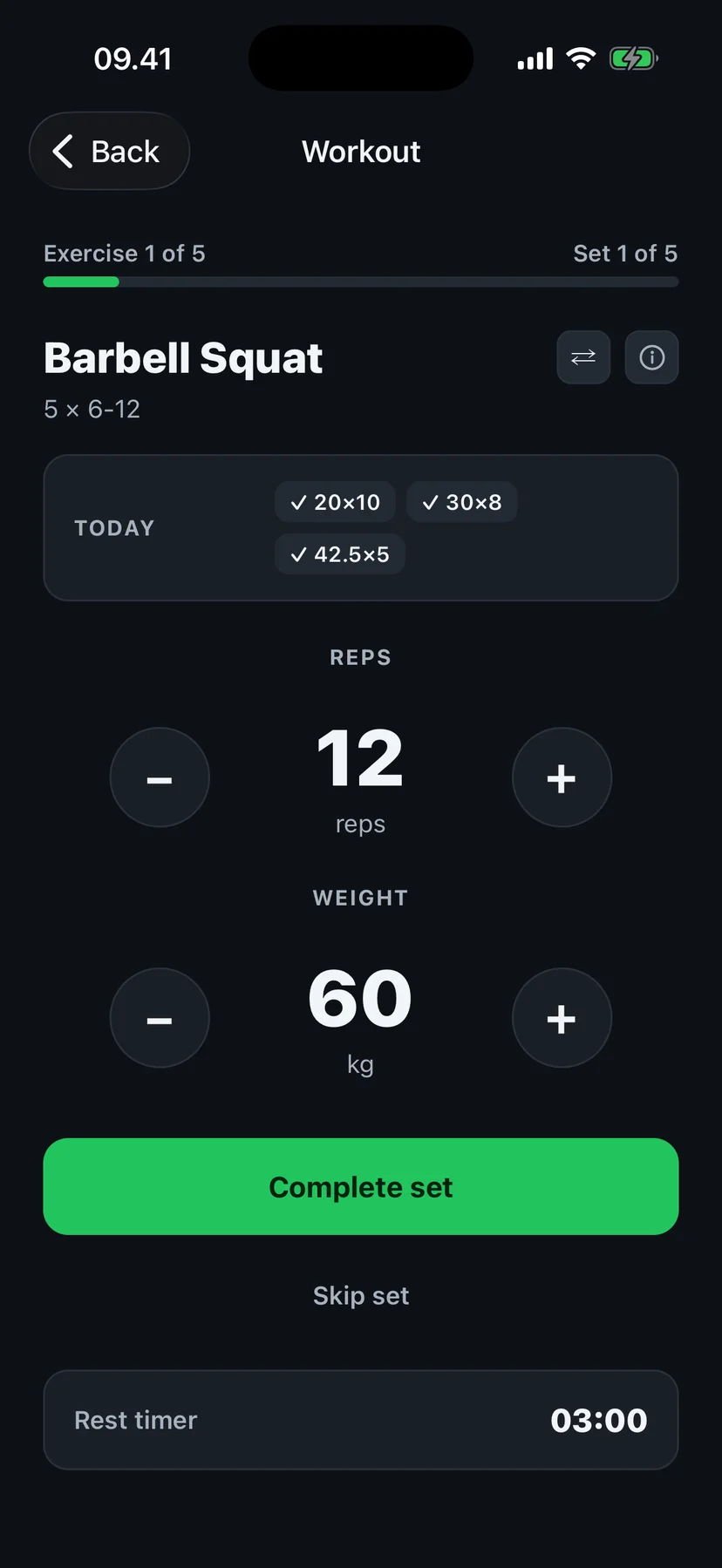
Every set shows what to lift: the weight and rep range are pre-filled from your plan, with a rest timer in between. Logging is two taps.
Set 1 of 560 kg× 6–12 repsProgress automatically
Reach the top of the rep range and the weight moves up next session. Volume climbs in waves and backs off in planned deloads — real periodization, not "add 2.5 kg every time".
12 · 12 · 12top of range at 60 kg62.5 kg next sessionAdapt on rough days
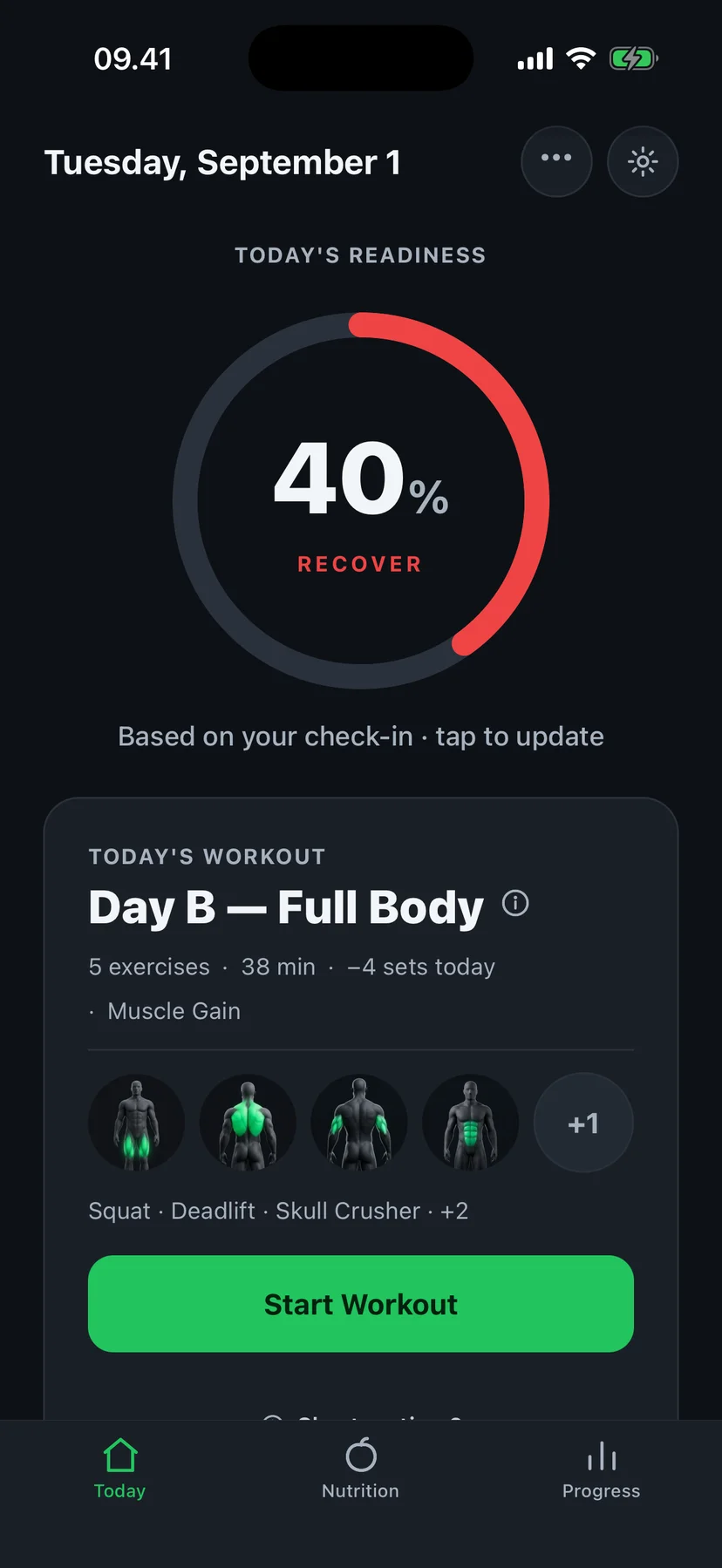
Sleep, HRV and resting heart rate come from Apple Health — or a ten-second check-in if you don't wear a watch — and they shape today's session. Rough night: fewer sets, a rep in reserve. Feeling fine anyway? Say so, and the plan believes you.
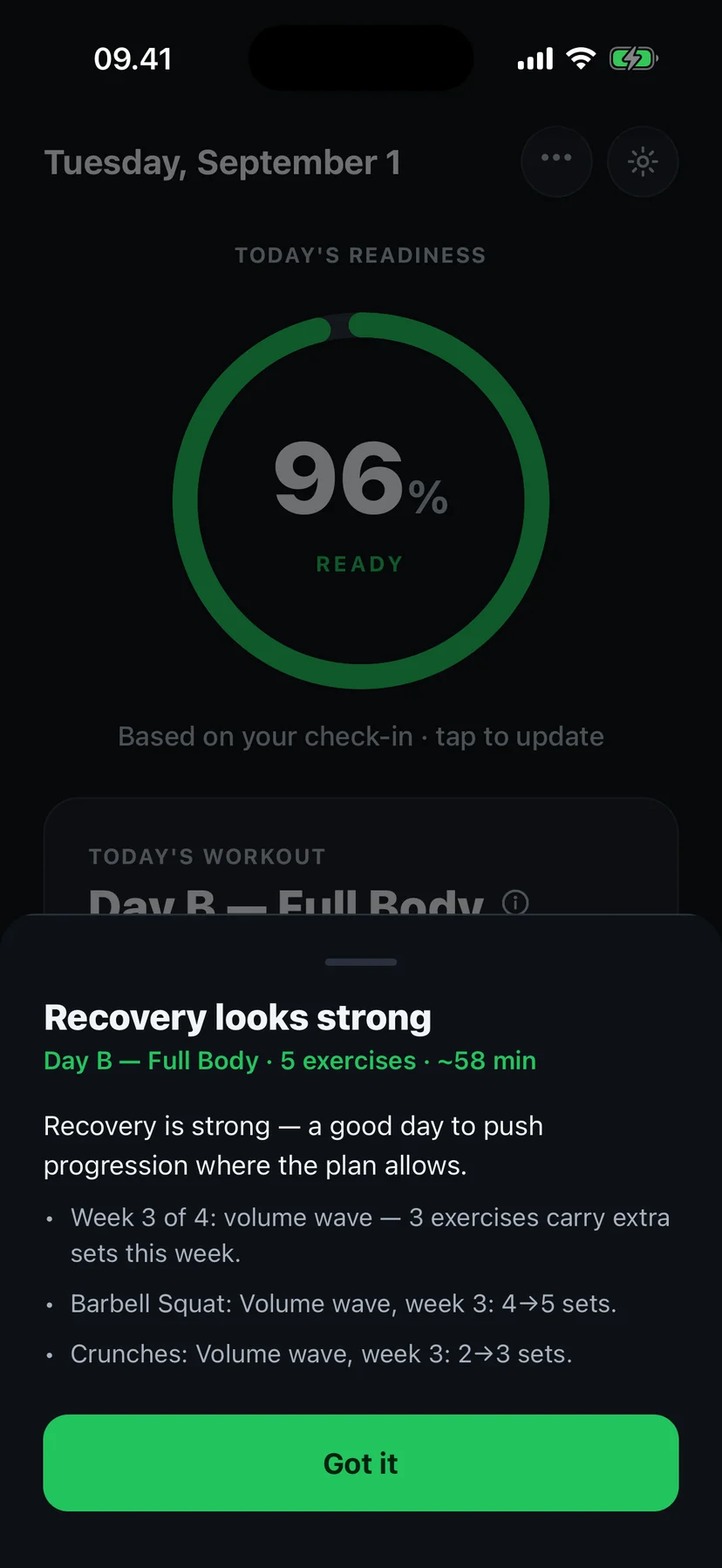
Ready · 96%
5 exercises · 58 min
Full volume, progression available
Recover · 40%
5 exercises · 38 min
Reduced volume, easier day
Built on training logic
Not randomly generated. Progressed by rules.
Fit4i uses consistent progression, volume and periodization rules. The same inputs produce the same programming decision.
AI is used where it helps — estimating meals from food photos. Core training decisions follow deterministic programming logic, not a language model.
Automatic progression
Fit4i knows when to add reps or weight based on your actual performance.
Smart deloads
When fatigue builds up, Fit4i automatically adjusts your training instead of pushing blindly.
Consistent training logic
Your progression follows clear rules instead of random AI-generated workouts.
Workouts built around you — then rebuilt every day.
Your program comes from a training engine grounded in sports science — progressive overload, volume waves and planned deloads — not from a fixed template.
Personalised program
Built from your goal, experience level, equipment and schedule — gym, home dumbbells or bodyweight only.
Automatic progression
Fill the rep range and the weight steps up — on an auto-built plan or on a routine day you saved yourself. Volume waves and deloads are part of Pro.
Short on time?
Twenty-five minutes instead of sixty? One tap compresses the session — the main lift survives.
You stay in control
Edit any generated program, enter a written program, or swap an exercise mid-workout — zone and load carry over. Missed a few days? No guilt screen — the muscles that fell behind catch up.
One plan. Two different mornings.
- Session
- Day B — Full Body
- Exercises
- 5 exercises
- Duration
- ≈ 58 min
- Volume
- Full volume
- Progression
- Available — weights can move up
Example recommendations from real app states. Your result depends on your data, recent training and check-in — the same percentage doesn't always produce the same decision.
Your plan should adapt when your body does.
The same program is not the right program every day. Fit4i uses your recovery signals to help adjust today's session — so hard days land when you can handle them.
What Fit4i looks at
HRV
vs your personal baseline
Sleep
duration and quality
Resting heart rate
vs your 30-day norm
Blood oxygen
overnight SpO₂
Recent load
days trained without rest
How you feel
a quick morning check-in
Readiness
“Recovery looks strong”
Adjusted workout
Day B — Full Body · 5 exercises · 58 min
Full session — a good day to push progression
Ready — Full session as planned — a good day to push.
Balanced — Session kept, volume trimmed about 25%.
Recover — An easy day — the plan backs off so you can come back stronger.
Know when to push — and when a lighter session makes more sense.
Readiness recommendations are guidance for training decisions, not a medical assessment. When recovery is poor — by sensor or by check-in — the day gets easier for everyone. Tuning the in-between days and early deloads are part of Fit4i Pro.
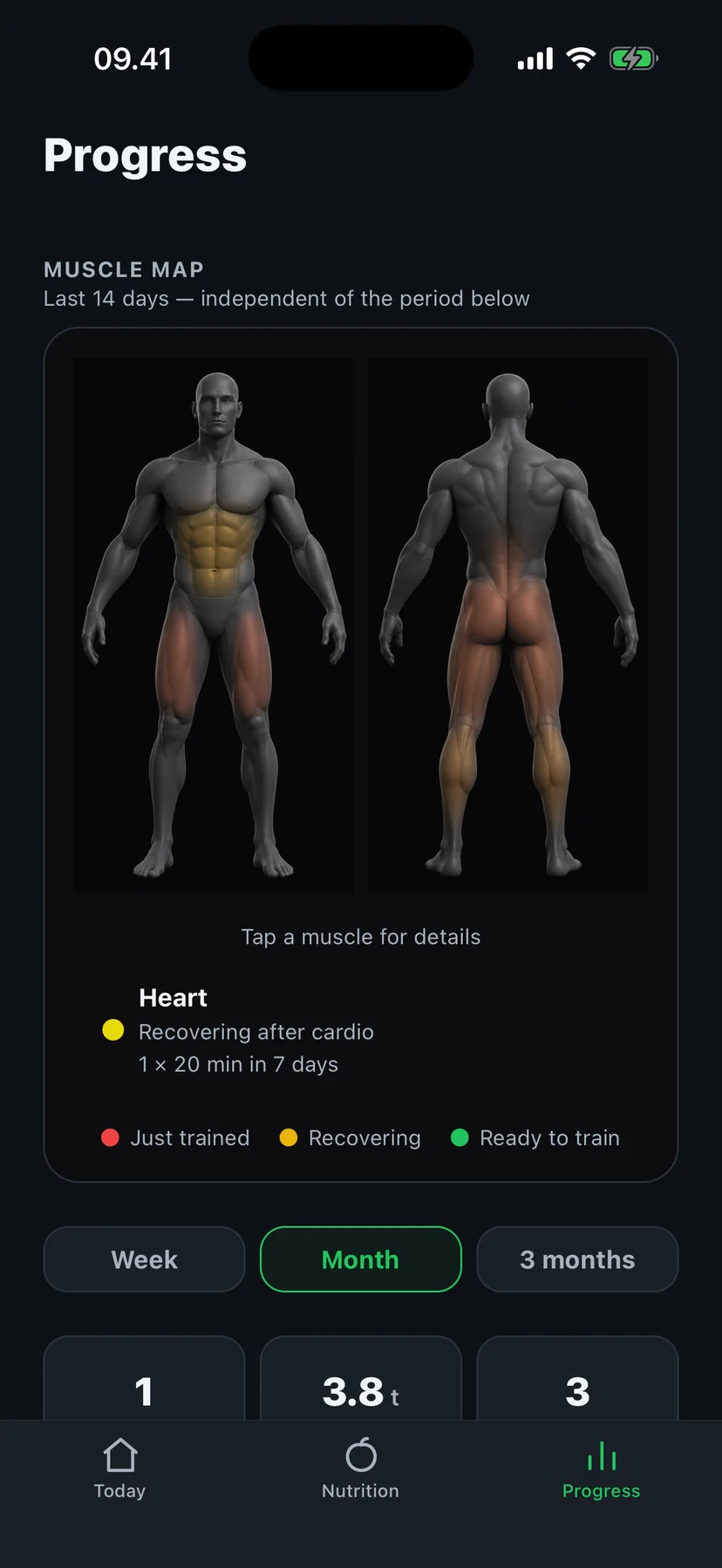
The muscle map doesn’t decorate. It decides.
Fourteen zones, each recovering from the sets you logged — weight, reps, how long ago. On your own routine it shows what you trained yesterday, what fell behind this week, and how many sets each zone got. On Build My Plan, every morning it serves the day your body is readiest for and says why in one line.
- Just trained
- Recovering
- Ready to train
Based on your logged sets and volume — not a medical measurement. A main lift that has waited too long goes first, so your deadlift never quietly disappears.
Training and nutrition in one place.
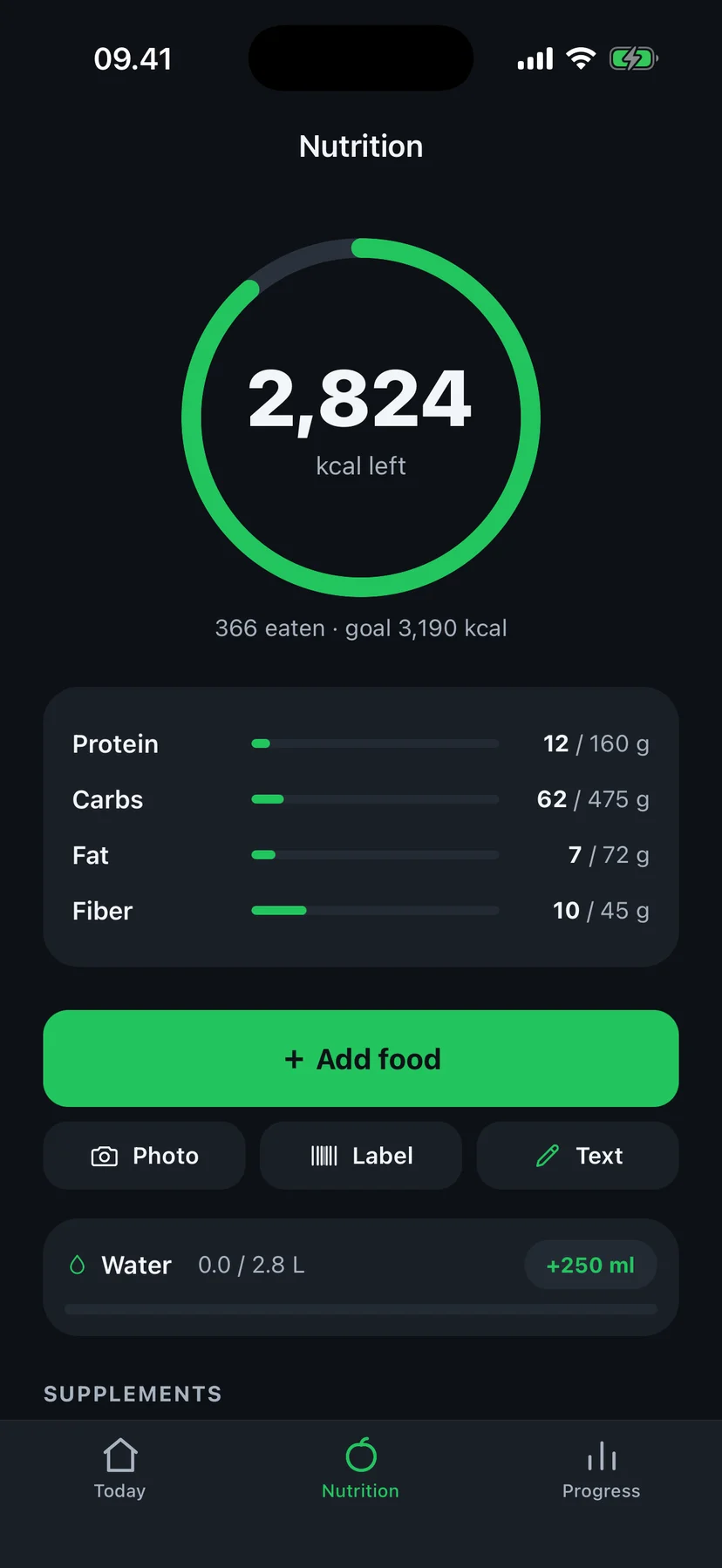
Daily calorie, protein and fiber targets tied to your goal — and, with Pro, they adapt as your weight trends.
Log a meal from a photo
Snap
Take a photo of your plate.
Recognise
Fit4i identifies the foods and estimates portions and macros.
Review
Check the results and correct anything that's off — nothing is logged blindly.
Done
The meal lands in your diary with calories, protein, carbs, fat and fiber.
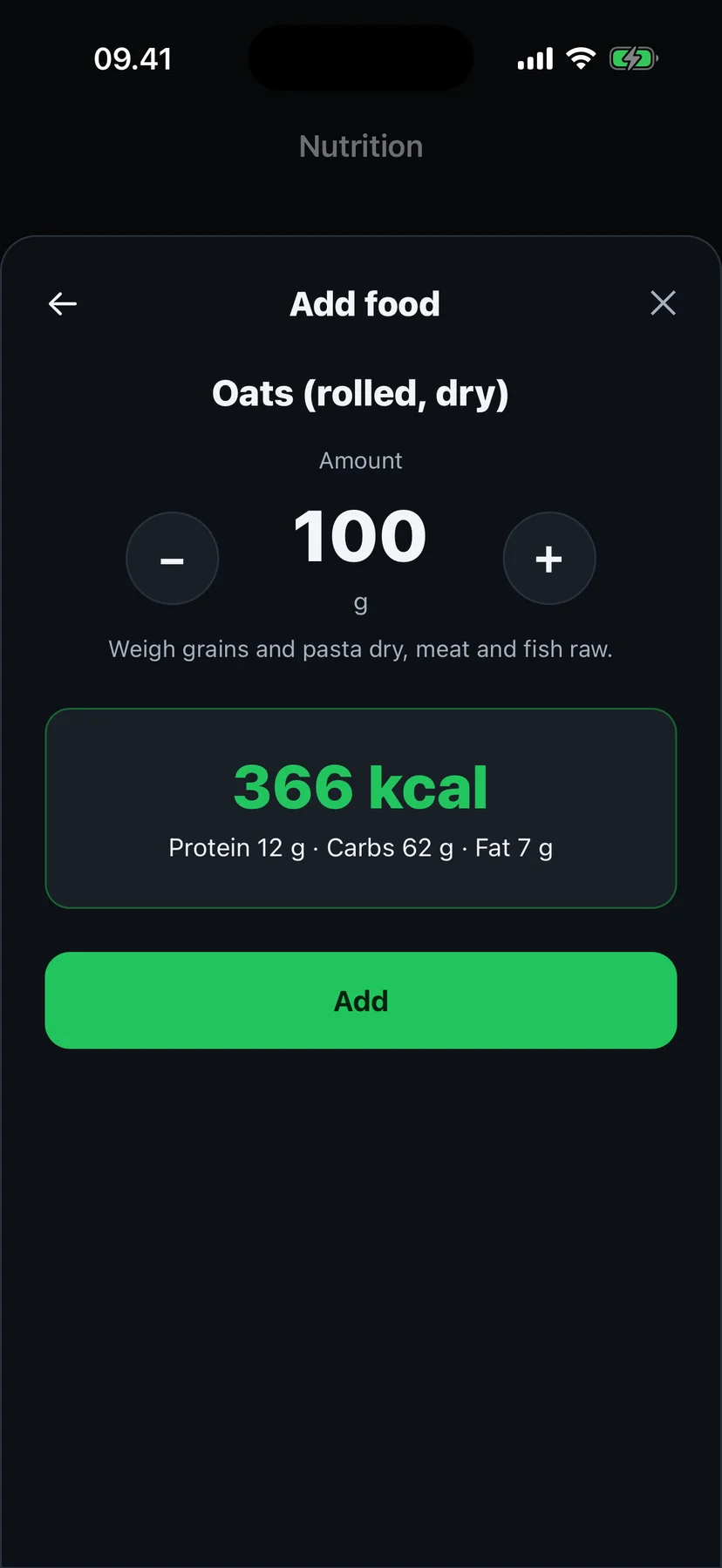
Recognised — review before saving
Oats (rolled, dry) · 100 g
kcal
P 12 g · C 62 g · F 7 g — every field editable
- Water tracking with a personal daily target
- Supplement logging — whey, gainer, creatine — with proper serving math
- Body-weight trend that recalculates your calorie target (Pro)
- Workout history, strength trends and personal records in Progress
Photo recognition produces estimates. Portions and mixed dishes can be hard to judge from a single photo, so you always review and confirm before anything is logged. Photo meal logging is part of Fit4i Pro.
Free to log. Pro when you want it to think.
Your first 14 days of Pro are free, no card. If you train on your own, the 14 days start the first time you finish a workout on a saved routine day.
Free
- The workout log — sets, reps, rest timer
- Routine days with slot targets
- "Last time" under every exercise
- History and personal records
- The 14-zone muscle map
- The one-line check-in
- The readiness ring — from sleep and HRV, or your check-in — and an easier day when recovery is poor
Pro
14 days free- The auto-built program and its rebuild
- Recovery tuning every day, not just the worst ones — plus early deloads
- Planned deloads and volume waves on auto-built programs
- Meals by photo, label or a quick description
- Calories that adapt to your weight trend
Pro is an auto-renewable subscription managed through the App Store. Cancel anytime in Settings. Train on your own? None of the trial is spent before you've seen a Pro feature.
Your data works for you. Nobody else.
Read-only Apple Health access
Fit4i reads sleep, HRV, resting heart rate, blood oxygen, steps and energy — only the types you approve, and it never writes anything back.
No ads, no selling, no cross-app tracking
Your health data is used to adapt your training — never for advertising, and it is never sold.
Food photos are not stored
A photo is analysed to estimate macros and then discarded. It is never saved or linked to your account.
Delete everything, anytime
Delete your account in the app (Settings → Delete account) and your profile, workouts, nutrition and health data are erased.
Frequently asked questions
What is Fit4i?
Fit4i is a gym workout tracker for iPhone. Log sets on your own — no setup wizard — and save any workout as a routine day, or let Fit4i build a plan from your recovery and equipment. Either way, every set feeds the same 14-zone muscle map, and nutrition tracking lives in the same app.
Does an AI generate my workouts?
No — core training decisions are deterministic. Progression, weekly volume and periodization are calculated by consistent programming rules, so the same inputs always produce the same programming decision. Fit4i uses AI for food-photo analysis, not for deciding your next weight.
Do I need an Apple Watch?
No. Fit4i reads data any device writes to Apple Health — an Apple Watch works great, but so do many other trackers. Polar devices can connect directly. And with no wearable at all, a ten-second check-in (how you slept, how you feel) drives the same adaptive logic.
Can I just log my workouts without a program?
Yes. Pick "I train on my own" on the first screen and you land in an empty workout — add exercises, or create your own, type weight and reps, tick the set. Next time the same exercise opens pre-filled with "Last time" under the name. The log, routine days, history, personal records and the muscle map are free.
Do I have to follow a program?
No. A routine day is optional: finish a workout and Fit4i asks "Save as a routine day?" — say no and nothing changes. Saved days get targets, and you can pause them any time; when you resume they catch up to your latest weights, never down. "Empty workout" is always there, even on top of a plan. Changed your mind? "Build my plan instead" lives in the Home menu — your logged weights become the plan's starting weights.
Are my sets saved if I lose the network mid-workout?
Every set is saved to your account as you log it — lose the network mid-workout and you lose at most one set; the rest are on your account.
Does Fit4i work without wearable data?
Yes. The full training engine — program generation, progression, periodization, time-based adjustments — works without any wearable. Readiness then comes from your subjective check-in instead of sensor data.
How accurate is food recognition?
It produces good estimates for common foods, but portions and mixed dishes are genuinely hard to judge from one photo. That's why Fit4i always shows you a review screen first — you check, correct and confirm before anything reaches your diary.
Is my health data private?
Yes. Health data is read with your explicit permission, used only to adapt your training, and never sold or used for advertising. Food photos are analysed and discarded. You can delete your account and all data from inside the app.
Is Fit4i a medical app?
No. Fit4i provides general fitness guidance for healthy adults. It does not diagnose, treat or prevent any condition, and readiness scores are training guidance, not medical assessments. Consult a physician before starting any exercise program.
Your first set is a minute away.
Tap an exercise, type weight × reps, done. Want a plan instead? Say so on the first screen.