Know which muscles are ready to train.
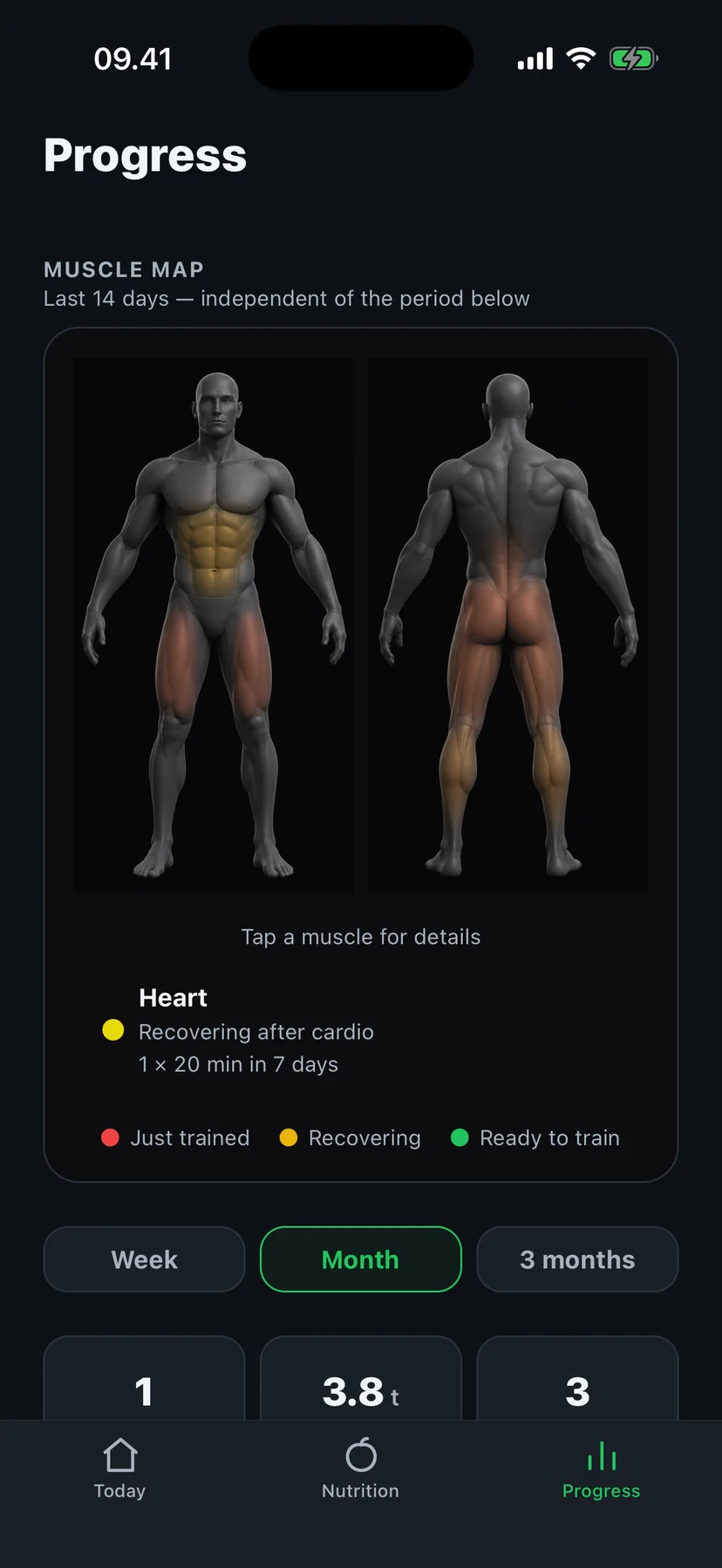
Walk into the gym and the real question is rarely “should I train?” — it's “what's actually ready to be trained?” Fit4i answers it with a muscle recovery map: front and back body figures where every zone shows whether it was just trained, is still recovering, or is ready to go again.
What muscle recovery actually is
Training doesn't make a muscle stronger during the session — it creates fatigue and a stimulus, and the adaptation happens in the hours and days afterwards. Train the same muscle again too soon and you cut that process short; wait too long and you leave progress on the table. Recovery time is the variable in between, and it's different for every muscle and every session.
Why one recovery number doesn't fit every muscle
A flat rule like “48 hours between workouts” ignores two things. First, muscle groups differ: large groups like quads, chest, lats, hamstrings and glutes generally need longer to recover from a full workload than smaller ones like biceps, triceps or calves — and abs bounce back fastest of all. Fit4i's engine reflects that: at a full dose, big zones get roughly a 72-hour window, smaller zones roughly 48, abs about 36.
Volume changes the clock
Second, recovery depends on how much work the muscle actually did. Fit4i counts the effective setseach zone received — compound lifts credit part of their work to the supporting muscles they also train — and scales the recovery window by that dose. Five hard sets of squats put your quads on a full clock; two light sets only start a much shorter one. A small touch of a muscle doesn't block it for three days.
How Fit4i tracks 14 muscle zones
- Every logged workout updates the affected zones — when each was last trained and how much effective volume it received.
- Each of the 14 zones gets its own estimated ready time, computed from the muscle group's base window and the actual dose.
- Zones that already hit their weekly volume ceiling are marked as done for the week — recovered is not the same as “add more work.”
- A zone you haven't trained in about ten days fades out — a quiet nudge that it's been a while.
- Tap any zone for the details behind its state.
Picking today's workout with the map
The map turns “what should I do today?” into a visual answer: green zones are fair game, recovering zones argue for patience, and a mostly-red upper body is a good sign it's leg day. It pairs with your plan — Fit4i's program already spaces muscle groups sensibly, and the map lets you sanity-check any manual changes, extra sessions or swapped days against what your body has actually done this week.
Built from your training log — nothing more
The muscle map is computed from the workouts you log in Fit4i: sets, exercises and timing. It doesn't claim to measure soreness, inflammation or tissue state, and it makes no medical assessment. It's an honest, explainable estimate — the same inputs always produce the same map.
Recovery for the whole day works too — read how readiness adjusts today's session.
Frequently asked questions
How does Fit4i know when a muscle is recovered?
From your logged workouts. Each zone gets a recovery window that starts when you last trained it. The window's length depends on the muscle group and on how much work it actually received — a heavy session extends it, a light touch shortens it. The map is an estimate built from training data, not a physiological measurement.
Does the map use HRV or wearable data?
No — the muscle map is computed purely from your logged sets. Wearable signals like HRV and sleep feed a separate, whole-body readiness score that adjusts today's session. The two work side by side: readiness for the day, the muscle map for individual muscle groups.
What does a green muscle mean?
The estimated recovery window has passed — the zone is ready to be trained again. One exception: if a muscle has already hit its weekly volume ceiling, Fit4i marks it as done for the week instead of inviting more work, even though it's recovered.
Can I see details for one muscle?
Yes — tap any zone on the map to see when it was last trained, how much effective volume it received, and when it's expected to be ready.
Is this medical or diagnostic information?
No. The muscle map is training guidance computed from your workout log. It doesn't measure inflammation, soreness or tissue damage, and it isn't a diagnosis. If something hurts beyond normal training fatigue, see a professional rather than an app.
Stop guessing which day it is. Train what's ready.